
Light
$1.99one time
- 2 images
- Purchased image credits never expire
Upload a portrait or pet photo, generate a cute 3D 16-sticker sheet, then export animated GIF reactions ready for chats, comments and creator posts.
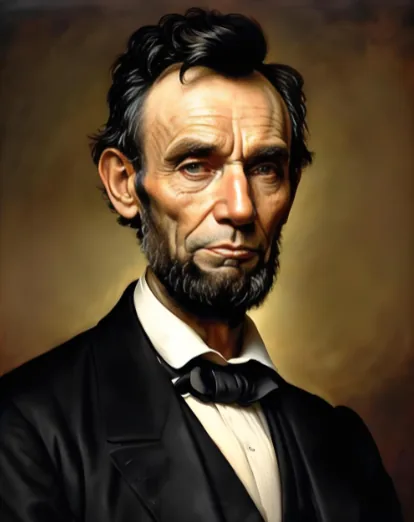
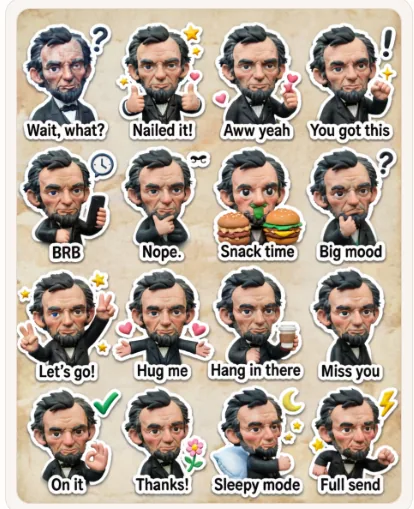
 16 GIF reactions
This example shows the full AI meme generator from photo workflow: start with a clear portrait, preserve recognizable traits like hair, beard, outfit and age, then turn the subject into a consistent cartoon sticker character with English reaction captions.
Use it as a quick quality benchmark before you upload your own image. The best inputs have one clear subject, readable facial features and enough detail for the AI to keep the character consistent across every meme sticker.
Try with your photoHistorical parody example. Not affiliated with any person, estate, institution or platform.



Receive one free image after first email verification, then add images with one-time USD purchases. Purchased image credits never expire.
A moderation rejection or technical generation failure does not consume an image. A successful user-requested regeneration consumes another image. See the Terms of Service for refund details.
Meme Generator From Photo is intended for lawful, personal, creator, marketing and social media meme creation. Users may not use the service to generate, request, upload or distribute adult, sexually explicit, exploitative, hateful, harassing, deceptive, illegal, infringing or high-risk content.
User-uploaded photos and generation prompts are subject to safety checks. We may block generation, remove content, limit access or suspend usage when content appears to violate our acceptable use rules.
Start with the generator above when you want a complete photo-to-sticker workflow. It keeps one subject consistent across a 16-panel sheet and prepares the result for animated GIF export.
Need help choosing a photo or planning a specific pack? Use the guides below for portraits, pets, or LINE-style chat reactions.
You can turn pictures into memes without editing software. The tool handles the AI prompt, sticker layout and animated GIF export directly in the browser. For the best result, start with one subject, keep the face or pet clearly visible, and avoid photos where the background is more important than the expression.
A strong reference photo makes the AI meme generator from photo more reliable. Pick an image where the face, body shape, hairstyle, or pet features are easy to read. Simple lighting helps the generator preserve the subject, while a busy background can make the final sticker character less consistent.
If your first output looks too different from the original person, try another portrait with clearer eyes and less blur. If the captions are the priority, use the prompt area to copy the production instructions into another image tool and refine the style before exporting the 16 animated GIF stickers.
An AI meme generator from photo is most useful when a normal caption maker is too limited. A basic meme maker can add text to a picture, but it usually keeps the original photo unchanged. This tool is designed for users who want the photo to become a reusable cartoon meme character with multiple moods, not just a single image with a joke on top.
The best use cases are personal, expressive, and repeatable. If you only need one captioned image, a simple meme editor may be enough. If you want a set of related sticker reactions from one photo, this AI meme generator from photo gives you a more complete workflow.
The output is designed around sharing. First, the generated 4x4 sheet gives you a full view of the character and all 16 reactions. Then the GIF tool splits the sheet into individual animated meme stickers, so you can download one reaction or collect every sticker in a ZIP file.
This matters because most people searching for a meme generator from photo do not want to stop at previewing an image. They want files they can actually send. The sheet is helpful for checking consistency, while separate GIF stickers are better for chat apps, comments, and social replies.
The page is organized as a short workflow instead of a loose collection of sections. Start with the tool, review the generated sticker sheet, export GIFs, then use the guide sections when you need better input photos or a more specific meme style. Search engines can also follow the same structure through the template links, how-to guide, use cases, output explanation and FAQ.